Section 7: Coin Page
Goal: The Coin Page enables traders to achieve two primary objectives: to analyze comprehensive data on a specific asset and to execute informed trades based on that analysis.
The page is divided into three structured sections, each designed with a distinct analytical focus.
These sections are described in detail in the subsequent Coin Metrics chapter.
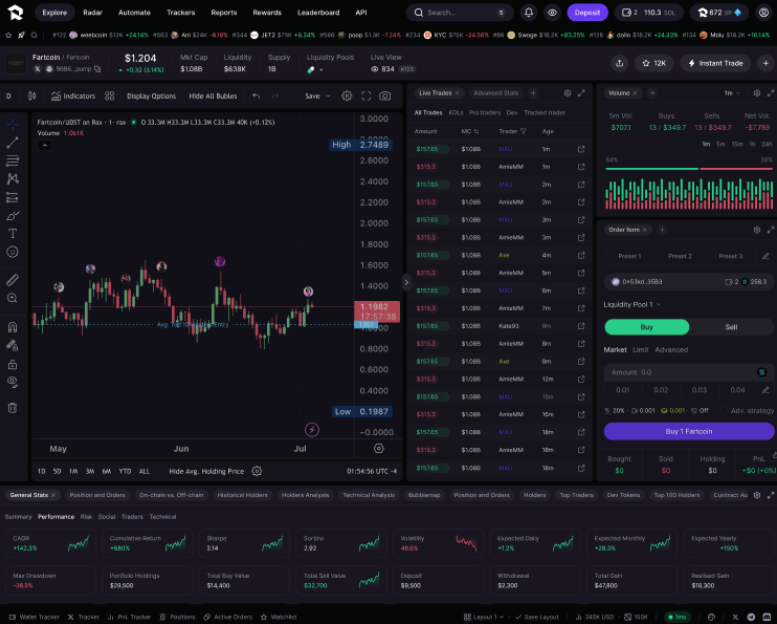
The Header
The Header section provides immediate access to essential coin information, presenting raw, unfiltered data without derived calculations.
It includes key metrics such as:
- Token price
- Liquidity metrics
- Liquidity pools
- Supply information
Interactive Feature:
Users can click on any listed liquidity pool to view its specific details. The header display automatically updates to reflect the selected pool’s data in real time.
The Chart
The Chart section provides a real-time visualization of market capitalization fluctuations for the selected coin, updating continuously at millisecond precision.
It integrates with TradingView.com to deliver advanced charting capabilities and customizable technical indicators for in-depth market analysis.
Chart Customization Options
Trader Bubbles
Visualize buy and sell activity in real time from:
- Popular traders in the market
- Traders you follow personally
Settings:
Users can enable, customize, or disable trader bubbles through the “Bubble Maps” control panel.
Average Price Lines
Display average entry prices for various trader categories (as defined in Chapter 1) or for your personal trading activity.
Dynamic Updates:
Average prices refresh in real time whenever traders within each category execute new buy or sell orders, ensuring continuous accuracy and live insight.
Live Trades
The Live Trades section displays real-time trading activity for the selected coin.
Users can minimize this view at any time by clicking the reduce arrow located between the chart and the live trades panel.
Early Transaction Visibility
RAX provides users with up to a three-second advantage over competitors by displaying pending transactions before full network confirmation.
How it works:
Every blockchain transaction follows three sequential stages:
- Routed — Transaction initiated
- Processed — Transaction validated (RAX begins displaying transactions here)
- Approved — Transaction fully confirmed
RAX shows transactions beginning at step 2 (Processed) and beyond, giving traders an early view of market activity as it develops.
Visual Indicators
- Grey transactions: Processed but not yet confirmed
- White transactions: Fully approved and confirmed
Trader Category Color-Coding
RAX classifies every trader globally (as defined in Chapter 1), assigning each category a distinct color within the live trades feed.
This color-coding allows users to instantly identify which trader types are currently active in the market.
Quick Volume
The Quick Volume tab allows users to analyze trading volume across customizable timeframes, offering both numerical data and real-time visualizations of market activity.
By hovering over the tab, users can adjust their analysis window to examine volume trends over different intervals.
This interactive feature enables rapid detection of trading intensity patterns and volume spikes, helping identify potential market shifts or large-scale strategic positioning changes.
Trade Tab
The Trade Tab enables users to execute trades on selected coins through RAX’s advanced routing infrastructure.
Our system leverages partnerships with top validators to ensure optimal trade execution, targeting inclusion in the next block for the fastest possible confirmation after submission.
To place a trade, users simply enter the required details — trade type (buy/sell), quantity, price parameters, and any additional order conditions.
This streamlined interface combines institutional-grade execution speed with user-friendly design, empowering traders to capitalize on market opportunities faster than competitors.
Order Types
RAX V1 supports two order types: Market Orders and Limit Orders.
-
Market Orders — Execute trades at the best available price. When submitting a market order, the trade is routed directly to the designated smart contract, and execution occurs immediately at the prevailing market rate (unless a slippage limit is set).
-
Limit Orders — Execute trades only at a specified price or better. For example, setting a buy limit at 130 or lower.
Wallet Selection
The Wallet Selection tab allows users to choose which wallets will fund their trades.
When multiple wallets are selected, the trade executes simultaneously across all chosen wallets using the same parameters.
Liquidity Pools
This section lets users define routing destinations for their trades.
Note: In RAX V1, only liquidity pools denominated in XSOL or XUSC are supported.
Trade Size
Specify your desired trade size, always denominated in SOL.
For example, entering a trade size of 1 swaps 1 SOL for the target coin.
Bribe Fee
The Bribe Fee is paid to validators to prioritize transaction execution, effectively bypassing the standard queue.
For instance, if RAX submits 10,000 trades to a validator with capacity for 1,000, the 1,000 trades offering the highest bribe fees are prioritized for the next block.
Slippage
The Slippage parameter sets the maximum allowable deviation between the expected and executed price.
For example, when buying a coin with a 100k market cap and a 5% maximum slippage, the highest payable price would correspond to a 105k market cap.
If the trade exceeds this threshold, it will be automatically cancelled before execution.
Priority Fee
The Priority Fee (optional) is a user-defined fee in SOL, paid to validators to increase the likelihood of inclusion in the next block — especially during periods of network congestion.
This acts as a bidding mechanism, granting higher execution priority in the leader’s queue for faster confirmation.
Presets
The Presets feature allows users to save preferred trade configurations for faster access.
Presets can be created, edited, or applied through the footer menu or via the pen icon next to the presets list, enabling rapid reuse of frequently used trade settings.
Advanced Metrics
The Advanced Metrics section provides comprehensive insights into the selected coin or liquidity pool.
Powered by RAX’s data infrastructure, it aggregates and visualizes on-chain metrics in real time, enabling the creation of advanced dashboards that transform raw blockchain data into actionable intelligence.
These analytics help users make faster, more informed decisions.
The specific metrics featured in this section are detailed in the following chapter: Coin Metrics.